Cooler Master Launches the
MasterKeys Pro L NVIDIA Edition
SINGAPORE – Cooler
Master,
a leader in design and manufacturing computer components and peripherals has
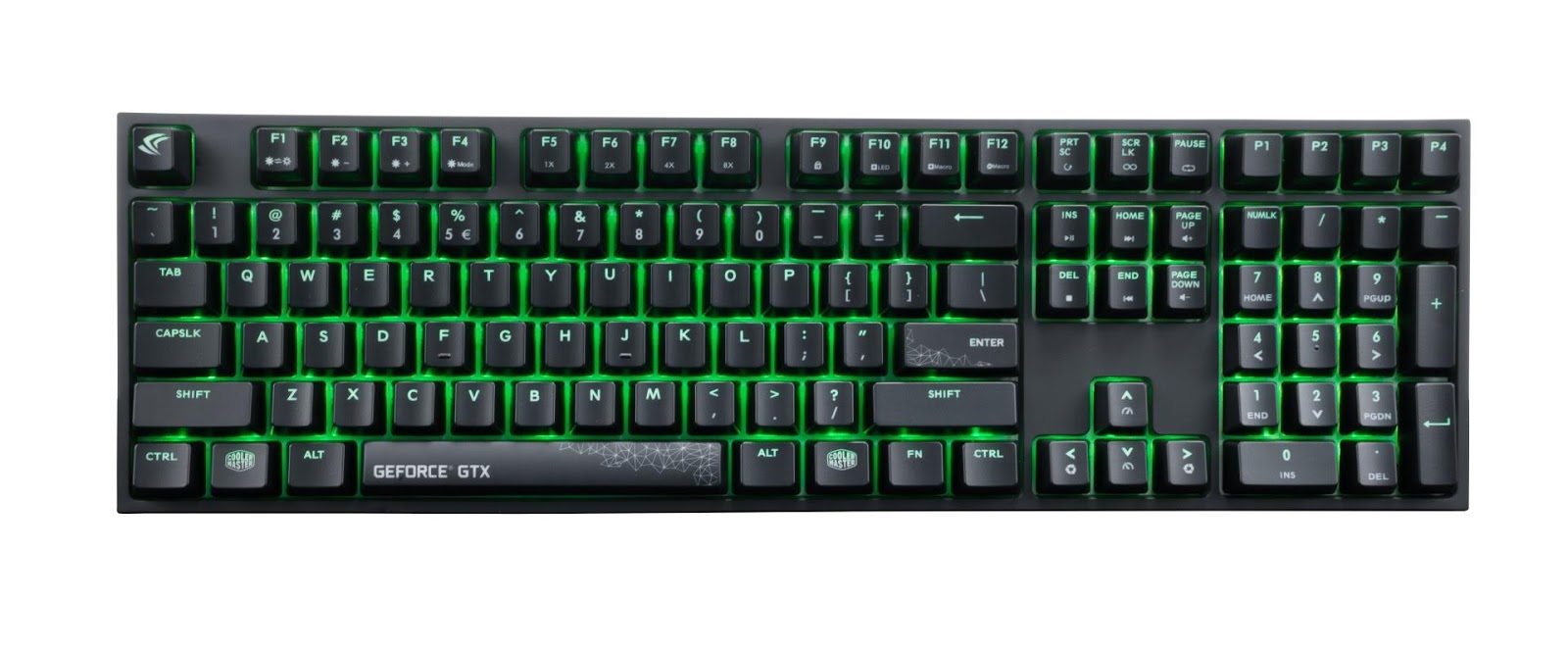
teamed up with NVIDIA to create and launch an NVIDIA edition keyboard for gamers and NVIDIA fans. The MasterKeys Pro L NVIDIA Edition provides luminous green LED
backlighting combined with the best responsive feeling that gamers have come to
love. The keyboard is equipped with Cherry MX Red Switches, multiple LED
lighting modes, on-the-fly macros, and profile support all in the simplistic
design everyone loves topped with custom NVIDIA keycaps.
NVIDIA
Keycaps
The MasterKeys Pro L NVIDIA Edition is dressed with three custom NVIDIA keycaps and a white steel
back plate that aids the radiant green LEDs shine bright and true. Users can
conveniently customize preset lighting modes without software including wave,
responsive effects, breathing and have on-the-fly macro and profile support
available to them.
On-the-fly System to Adjust Lighting Modes
The intuitively placed function keys layer allows you to manually adjust
the lighting speed and mode to match your personal taste. To alter the lighting
modes, press FN + F4 to cycle. You can also modify the light speed by pressing
FN + the up and down arrow keys with the speed icon and direction with FN +
Left or right arrow. Whatever your style or preference is, it can be altered at
the tip of your fingers, without the need to install or use software.
Suitable for Work and Play
The keyboard comes
with a default and gaming profile modes. While working or doing homework you
can disable gaming macros and lighting modes by pressing FN + ESC to enter
default mode and prevent the use of any macro’s. When you’re ready to get back
into the game, use the four dedicated profiles for all your lighting and macros
for a quick and easy switch to boost your performance. The
Status Indicator System, by holding down the FN key, makes it easy to navigate
the On-the-fly System and easily change settings and profiles by just glancing
at the keyboard.

Pricing & Availability:
The
MasterKeys Pro L NVIDIA Edition is now available at major resellers in Singapore, priced at SGD 159.
For the LATEST tech updates,
FOLLOW us on our Twitter
LIKE us on our FaceBook
SUBSCRIBE to us on our YouTube Channel!