Why You Won’t Find Blue Ticks in WeChat
At WeChat, our users’ privacy is top of mind in all aspects of product development. For our over 468M monthly active users, it is important to us they have the ability to control their own privacy and information shared when communicating on WeChat.
To ensure this, we have made the following product decisions to empower users:
No Message Read Confirmations
This is why we decided not to include message read confirmations because we believe the exact time you read a message in WeChat is your business and no one else’s – unless you make that decision yourself. Users can chat freely in WeChat knowing the other party will not see any timestamp or receive information about your messaging behavior other than the content of the conversation you choose to share.
Other WeChat privacy functionalities include:
- Keeping your mobile number private – While WeChat enables you to make free voice and video calls, we do not display your mobile phone number for others to see. After all, you wouldn’t give out your number to just anyone would you?
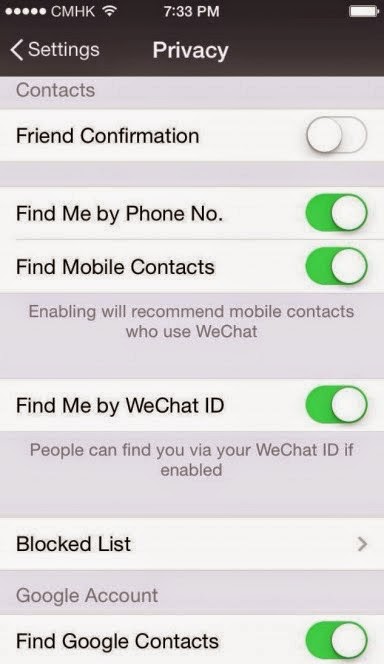
- Easily control who and when people can contact you – In the app, users can simply tap “Me”-> “Settings” -> “Privacy” to switch on “Friend Confirmation.” This feature requires other users to send an initial friend request before being able to chat with the other user. The Privacy tab also includes the ability to turn on or off the “Find Me” option, allowing the user to determine if he or she would like to be found by WeChat ID or mobile number.
- Opting in or out of location based services – Users can opt in or out of WeChat’s LBS services by turning on or off this feature in their phone’s settings. This pertains to features such as Friend Radar, Shake, People Nearby and Private Group chat.
- Block unwanted parties – We all have experienced the regret of adding a contact we no longer want to talk to. With WeChat, users can simply click the person they would like to block to view their profile -> tap “ ” in the upper right corner -> then slide the “Block” option to the right to enable. The selected contact will no longer be able to message or reach the user.
- Smart sharing on Moments – WeChat’s Moments feature gives users the power to determine with whom they share their photos, links or videos. In the Privacy tab, users can select to make their Moments posts private or public to those who view their WeChat profile. When posting, they can also select specific groups from their contacts to share each post with. And only friends can view friends’ comments, not friend of friends – ensuring your information doesn’t fall into the wrong hands.
WeChat has also received the Certified Privacy Seal, granted by TRUSTe, a leading global Data Privacy Management (DPM) company. The certification confirms WeChat’s operation has fulfilled the TRUSTe Program Requirements, providing a high-level of protection to safeguard users’ information.
For the LATEST tech updates,
FOLLOW us on our Twitter
LIKE us on our FaceBook
SUBSCRIBE to us on our YouTube Channel!